
-
Mail us
sale@tiger-transformer.com -
Phone us
(+86)15155183777 -


Mail us
sale@tiger-transformer.comPhone us
(+86)15155183777
TFTP protocol
TFTP (Trivial File Transfer Protocol) is a protocol in the TCP/IP protocol family used for file transfer between the client and the server, and the port number is 69. TFTP is based on the UDP protocol, with low overhead and high efficiency. However, TFTP can only obtain or write files from the server, and cannot list directories or perform authentication.
Hardware Block Diagram

Common block diagrams are not much different. Taking STM32H7 as an example, the ARM core and MAC controller are integrated in one MCU chip, and the outside is connected to the PHY chip. After passing through the network transformer, it is connected to the PC terminal through a network cable. way to connect to the remote server.
From the perspective of the operating system, the hardware block diagram is not important. For rt-thread, it only focuses on the protocol application itself, and the interaction with the hardware is well adapted when transplanting. Can. The following takes the QEMU virtual development board in the RT-Thread source package as an example to introduce how to use the tftp function that comes with lwip to transfer files.
RT-Thread Construction Framework
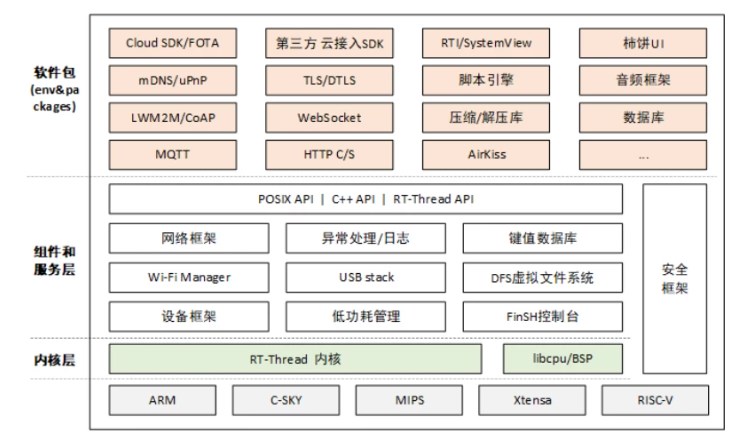
RTThread source package provides a complete operating system, from the kernel to the component service layer, as well as certified third-party software packages, which is very convenient for developers to develop applications. Developers only need to care about and use the network interface provided by the network application layer, and do not need to care about the specific type and implementation of the underlying network protocol stack. To transfer files using tftp, the file system needs to be mounted in advance. This article does not describe much, and we mainly focus on Lwip. web app.
Modify build configuration
In the apps folder of lwip, there are source files related to tftp, but rtthread is not open to users in the build tool, and version 2.0.3 is the For example, open the corresponding SConscript file, the path is
rt-thread/components/net/lwip/lwip-2.0.3/SConscript
The content from line 61 to line 85 is:
path = [GetCurrentDir() + '/src/include',
GetCurrentDir() + '/src/include/ipv4 ',
GetCurrentDir() + '/src/include/netif']
if not GetDepend('RT_USING_SAL'):
path += [GetCurrentDir() + '/src/include/ posix']
if GetDepend(['RT_LWIP_SNMP']):
src += snmp_src
path += [GetCurrentDir() + '/src/apps/snmp']
if GetDepend(['RT_LWIP_PPP']):
src += ppp_src
path += [GetCurrentDir() + '/src/netif/ppp']
if GetDepend(['RT_USING_LWIP_IPV6' ]):
src += ipv6_src
if GetDepend(['RT_LWIP_USING_PING']):
src += Glob('src/apps/ping/ping.c')
group = DefineGroup('lwIP', src, depend = ['RT_USING_LWIP', 'RT_USING_LWIP203'], CPPPATH = path)
Return('group')
The function of this script refers to , if the corresponding macro definition is defined, add this part of the source code to the project and participate in the compilation. But from this point of view, the tftp part that comes with lwip is not added, so this part of the script needs to be modified, a macro judgment is added, and the .c file under the tftp folder is added. The modified content is:
....
if GetDepend(['RT_LWIP_USING_PING']):
src += Glob('src/apps/ping/ping.c')
if GetDepend([ 'RT_LWIP_USING_TFTP']):
src += Glob('src/apps/tftp/*.c')
group = DefineGroup('lwIP', src, depend = ['RT_USING_LWIP', 'RT_USING_LWIP203 '], CPPPATH = path)
The built script has been modified, and the addition of macros needs to be modified. Only when the RT_LWIP_USING_TFTP macro is added, will the c file under tftp be added to the project. There are two types here One method is to directly add the macro definition in rtconfig.h under the root directory of the project
#define RT_LWIP_USING_TFTP
The other is to modify the menuconfig menu options, add macro settings, and modify the method To open the rt-thread/components/net/lwip/Kconfig file, add RT_LWIP_USING_TFTP settings around line 8
....
if RT_USING_LWIP
config RT_LWIP_USING_TFTP
bool "Use tftp app"
default n
config RT_USING_LWIP_LOCAL_VERSION
bool "Use LwIP local version only"
default n
help
If don't select this option, both local version and upstream
....
After Kconfig is modified, there will be an additional menu option on the configuration interface, enable this menu, and then use scons to build it automatically Add this macro to the rtconfig.h file.
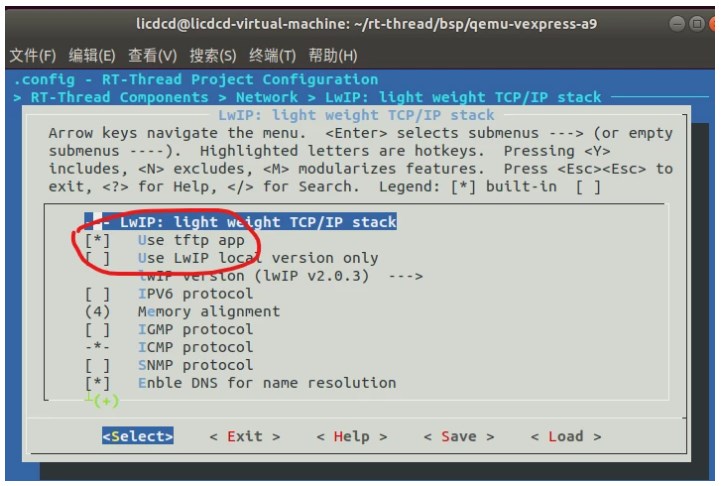
Effect demonstration
Enter the msh terminal, enter help to view the supported functions, among which tftp_server is the function realized by the above operations
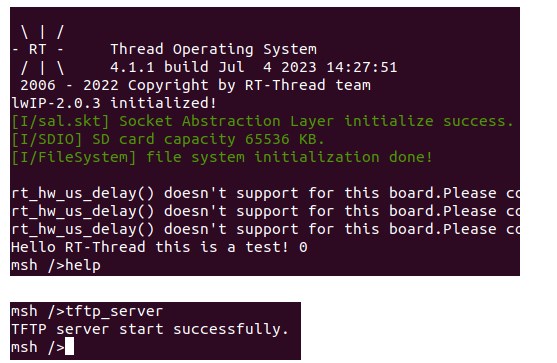
After entering tftp_server and pressing Enter to run, the tftp server will be started, enter ifconfig to view the ip address of the development board, mine is 192.168.75.130
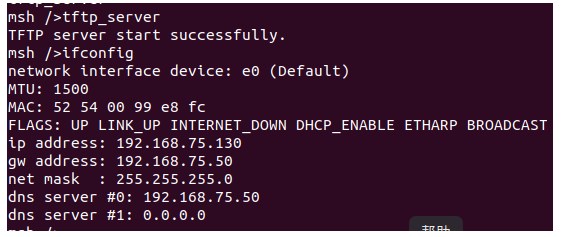
Open the tftp tool on the computer side, as a tftp client, enter the development board on the Host ip, port is set to 69, select a local computer file and click put to send the file to the development board, such as the TOP.bin file on my computer